echo "export PATH=\$PATH:/usr/sbin:/sbin:/usr/local/sbin" >> /root/.bashrc
################################################
### CONFIG apache (in debian)
a2enmod userdir
a2enmod alias
a2enmod auth_digest
a2enmod setenvif
################################################
### COMMON:
Create user usuaris:
groupadd usuaris
useradd -m -c "usuaris user" -g usuaris -s /bin/bash usuaris
echo usuaris:YOUR_PASSWORD_HERE | chpasswd
Download usuaris from http://www.cucurella.net/soft/usuaris_linux_socket/
Copy file usuaris_*.tar.gz to /home/usuaris
Uncompress usuaris_*.tar.gz:
cd /home/usuaris
su usuaris
tar xvzf usuaris_*.tar.gz
Rename dir usuaris to public_html and exit:
mv usuaris public_html
exit
Add this to file /etc/apache2/mods-available/php8.2.conf:
### mod-ruid2
<IfModule mod_ruid2.c>
RMode stat
</IfModule>
### mpm_itk module
<IfModule !mod_ruid2.c>
<IfModule mpm_itk_module>
IncludeOptional mpm-itk-users/*.conf
</IfModule>
</IfModule>
Content of file /etc/apache2/conf-available/php8.2-fpm.conf:
<IfModule proxy_fcgi_module>
<IfModule setenvif_module>
SetEnvIfNoCase ^Authorization$ "(.+)" HTTP_AUTHORIZATION=$1
</IfModule>
# Deny access to raw php sources by default
<FilesMatch ".+\.phps$">
Require all denied
</FilesMatch>
# Deny access to files without filename (e.g. '.php')
<FilesMatch "^\.ph(?:ar|p|ps|tml)$">
Require all denied
</FilesMatch>
</IfModule>
Create dir:
mkdir /etc/apache2/php-users
Content of file /etc/apache2/php-users/usuaris.conf:
<IfModule mod_proxy_fcgi.c>
<Directory /home/usuaris/public_html>
<FilesMatch \.php$>
SetHandler "proxy:unix:/run/php/php-fpm-usuaris.sock|fcgi://localhost"
</FilesMatch>
</Directory>
</IfModule>
Content of file /etc/php/8.2/fpm/pool.d/usuaris.conf:
[usuaris]
listen = /run/php/php-fpm-usuaris.sock
listen.allowed_clients = 127.0.0.1
listen.owner = www-data
listen.group = www-data
user = usuaris
group = usuaris
pm = dynamic
pm.max_children = 10
pm.start_servers = 1
pm.min_spare_servers = 1
pm.max_spare_servers = 5
pm.max_requests = 500
Create dir:
mkdir /etc/apache2/mpm-itk-users
Create file /etc/apache2/mpm-itk-users/usuaris.conf:
<IfModule mpm_itk_module>
<Directory "/home/usuaris/public_html">
AssignUserID usuaris usuaris
</Directory>
</IfModule>
Add this to /etc/apache2/apache2.conf:
### ServerName
ServerName localhost
### no indexes
<Directory "/home/*/public_html">
Options -Indexes
</Directory>
### php-fpm
IncludeOptional php-users/*.conf
IncludeOptional mpm-itk-users/*.conf
Exec this:
chmod 0711 /home/usuaris/
chmod 0755 /home/usuaris/public_html/
[A] PHP running with SAPI fpm-fcgi (php-fpm)
(with the apache modules proxy and proxy_fcgi)
a2dismod ruid2
a2dismod mpm_itk
a2dismod php8.2
a2dismod mpm_prefork
a2enmod mpm_event
a2enmod proxy
a2enmod proxy_fcgi
a2enconf php8.2-fpm
systemctl enable php8.2-fpm.service
service apache2 restart
service php8.2-fpm start
For check SAPI, from usuaris admin, click to:
OTHER OPTIONS ➜ help ➜ SAPI
[B] PHP running with SAPI apache2handler (libapache2-mod-php)
(with the apache module ruid2)
INSTALL libapache2-mod-ruid2:
https://packages.ubuntu.com/jammy/libapache2-mod-ruid2
service php8.2-fpm stop
systemctl disable php8.2-fpm.service
a2dismod proxy_fcgi
a2dismod proxy
a2dismod mpm_event
a2enmod mpm_prefork
a2enmod php8.2
a2dismod mpm_itk
a2enmod ruid2
service apache2 restart
For check SAPI and apache module, from usuaris admin, click to:
OTHER OPTIONS ➜ help ➜ SAPI
[C] PHP running with SAPI apache2handler (libapache2-mod-php)
(with the apache module mpm_itk)
INSTALL libapache2-mpm-itk:
apt install libapache2-mpm-itk
service php8.2-fpm stop
systemctl disable php8.2-fpm.service
a2dismod proxy_fcgi
a2dismod proxy
a2dismod ruid2
a2dismod mpm_event
a2enmod mpm_prefork
a2enmod php8.2
a2enmod mpm_itk
service apache2 restart
With the browser, from usuaris admin, click to:
USERS ➜ Restore mpm-itk config for all users
For check SAPI and apache module, from usuaris admin, click to:
OTHER OPTIONS ➜ help ➜ SAPI
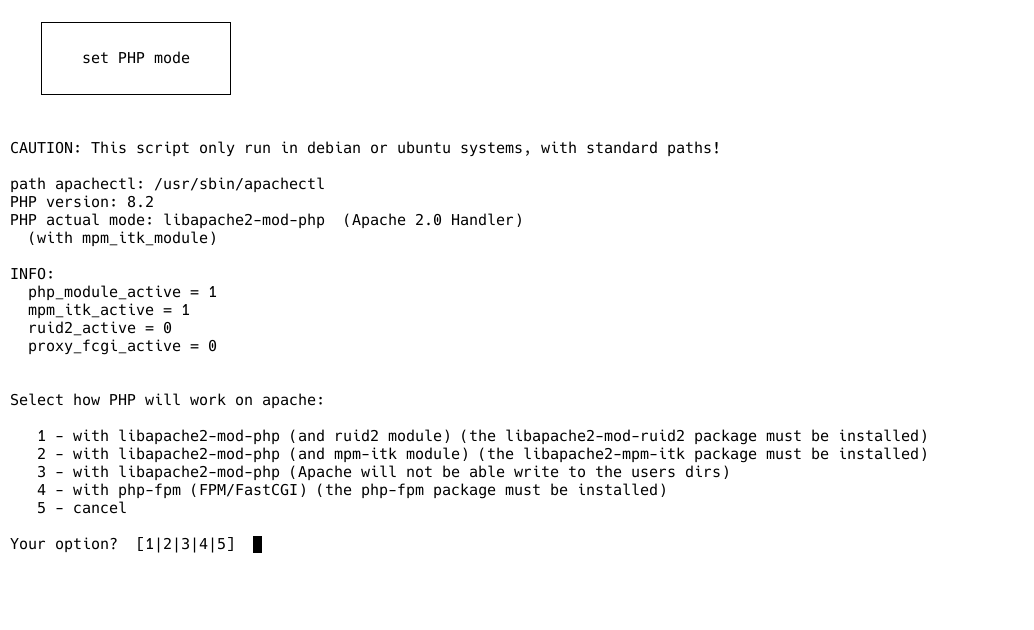
[D] select how run PHP from a bash script
cd /home/usuaris/public_html/admin/INSTALL/
chmod 0755 php-mode.sh
sudo ./php-mode.sh